How to watch Formula 1’s Australian GP on Apple TV
The 2026 FIA Formula 1 World Championship begins this weekend on Apple TV with the Australian Grand Prix from Melbourne's Albert Park. As the new exclusive U.S. home of Formula 1, Apple TV is the place to watch every Grand Prix live and on demand – including all practice, qualifying, and Sprint sessions, along with races – all season long.
The Australian GP starts Saturday, March 7, at 8pm ET on Apple TV, with all sessions available to stream live and on demand.
F1 on Apple TV is available in the U.S. on the Apple TV app on iPhone; iPad; Apple TV 4K; Apple Vision Pro; Mac; popular smart TVs from Samsung, LG, Sony, VIZIO, TCL, and others; Roku and Amazon Fire TV devices; Chromecast with Google TV; PlayStation and Xbox gaming consoles; and at tv.apple.com, for $12.99 per month with a seven-day free trial for new subscribers. For a limited time, eligible customers who purchase and activate a new iPhone, iPad, Apple TV, or Mac can enjoy three months of Apple TV for free. Visit apple.com/tvpr and see the full list of supported devices.
Apple TV's F1 coverage will include the following:
- Every Grand Prix live and on demand, including practice, qualifying and Sprint sessions
- First-ever 4K with Dolby Vision + 5.1 surround sound for F1 in the U.S.
- English and Spanish commentary
- Up to 30 additional live feeds per session (Driver Tracker, telemetry, mixed onboard cameras, and more)
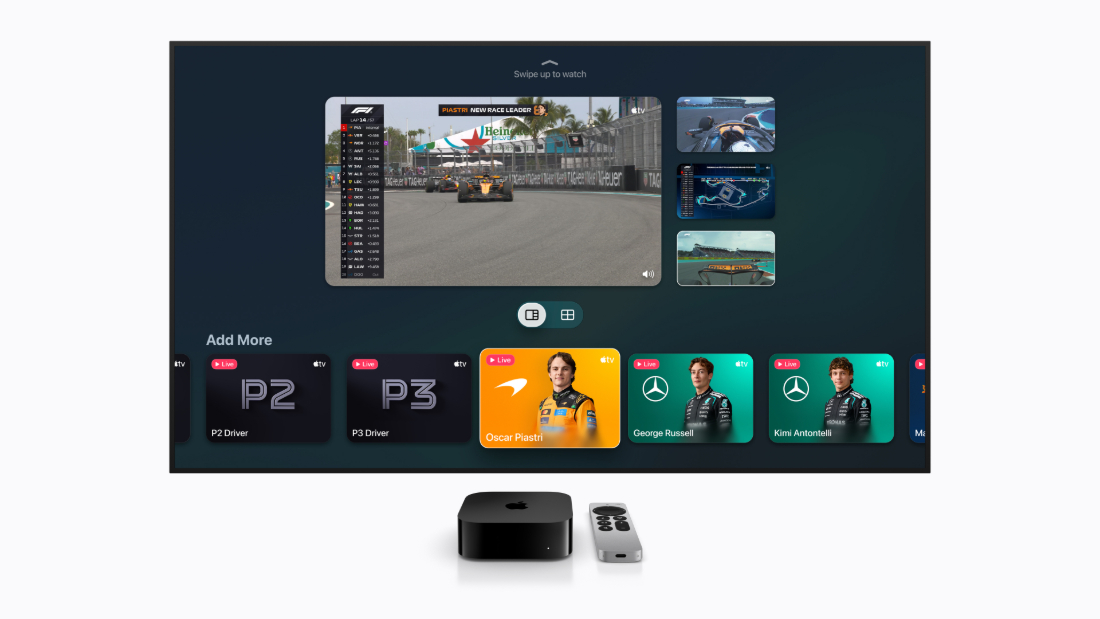
- Multiview — watch up to four live feeds simultaneously via a preconfigured one-tap layout or personalize your own
- Full replays, highlights, and spoiler-free Race in 30
Apple will expand access to live Formula 1 coverage through a new streaming collaboration with Yahoo Sports. Live practice sessions and qualifying sessions will stream in the U.S. across the Yahoo Sports platform. Coverage of practice sessions will feature Apple TV’s main broadcast feed coverage, and qualifying sessions will offer a mixed onboard feed that switches between driver cameras throughout the race to provide a dynamic, multi-angle view of the action. With more than 100 million monthly active users in the U.S., Yahoo Sports offers significant reach to connect even more fans to the sport.
Coverage of every Grand Prix will have access to up to 30 additional live feeds across all sessions. These include Driver Tracker for a bird’s-eye view of the race; real-time telemetry and timing; a mixed onboard feed that automatically switches between onboard cameras as the race unfolds; and Podium feeds that dynamically follow the drivers running in P1, P2 and P3 throughout.
Viewers can follow every moment of the race with a Multiview experience, watching up to four live feeds at once. They can easily get started with a one-tap, preconfigured Multiview layout for every team, or if they prefer even more personalization, they can customize their own Multiview and choose which feeds they’d like to follow.
Viewers will also have access to Sky Sports broadcasts, providing another way to enjoy every race weekend.
Apple TV subscribers can explore curated collections of programming covering everything they need to know heading into the 2026 season, including rule changes, new cars, team updates, the full race calendar, and the most exciting moments from last season. If they miss a session, they can catch up anytime with full replays, highlights, and Race in 30 – all spoiler-free.
F1 TV Premium – Formula 1’s premier direct-to-consumer offering – remains available exclusively in the U.S. through Apple TV and is included at no additional cost for subscribers. On Apple TV, iPad, and iPhone, subscribers can also access Formula 2, Formula 3, F1 Academy and Porsche Supercup events through the F1 TV app using their Apple TV subscription.
Fans can follow Formula 1 on Apple TV and explore an extensive collection of curated programming at apple.co/f1onappletv.

RACER Staff
Read RACER Staff's articles
Latest News
Comments
Comments are disabled until you accept Social Networking Cookies. Update cookie preferences
If the dialog doesn't appear, ad-blockers are often the cause; try disabling yours or see our Social Features Support.